
Download Easy Sticker Maker – AI Sticker Creator, Free Online Tool
Overview
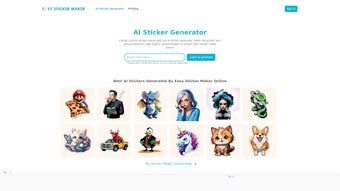
Easy Sticker Maker is a web‑based application that brings the power of artificial intelligence to anyone who wants to create custom stickers without learning complex design software. By simply typing a textual description—such as “retro‑style coffee cup with a smiling sun” or “pixel‑art dinosaur in neon colors”—the AI engine instantly generates a high‑resolution sticker that matches the requested theme, style, and color palette. The platform is built for speed and accessibility: a user can go from idea to downloadable PNG in under a minute, making it perfect for social‑media managers, teachers, hobbyists, and even small businesses that need quick branding assets.
The interface is intentionally minimalistic. A single input box, a few style toggles, and a real‑time preview keep the workflow focused, while the “Regenerate” button offers instant revisions if the first output doesn’t hit the mark. The service supports multiple languages, allowing non‑English speakers to describe their concepts naturally.
Although stickers are public by default, the development roadmap promises future privacy controls for users who want to keep their creations private or share them only with selected collaborators. Registration is free and grants a starter pack of credits that can be used to generate stickers. Additional credits are available for purchase, but the free tier is generous enough for casual creators.
Easy Sticker Maker also incorporates responsible AI guidelines, filtering out prohibited content and providing clear usage policies to ensure a safe community. Whether you need a playful avatar for a chat app, a branded badge for a newsletter, or a fun illustration for a classroom activity, Easy Sticker Maker delivers a secure, fast, and cost‑effective solution. The platform’s cloud‑based architecture means that updates, new style packs, and bug fixes are rolled out automatically, so users always work with the latest version without manual intervention.
Key Features that Set Easy Sticker Maker Apart
The real strength of Easy Sticker Maker lies in the breadth and depth of its feature set. While the core promise is AI‑driven sticker creation, the tool layers additional capabilities that turn a simple prompt into a polished design asset ready for any channel. Below is a detailed look at the most valuable functionalities, each engineered to streamline the creative process and give users maximum flexibility.
- AI‑Driven Generation: Powered by a state‑of‑the‑art language‑image model that interprets natural‑language prompts and creates vector‑quality stickers in seconds.
- Multi‑Language Support: Input prompts in over 20 languages, allowing global users to describe their ideas in their native tongue.
- Instant Preview & Regeneration: View a live preview as the AI renders the sticker and click “Regenerate” for instant tweaks without starting over.
- Style & Theme Controls: Choose from preset styles (retro, cartoon, minimalist, neon, etc.) and adjust color palettes to match brand guidelines.
- High‑Resolution Export: Download stickers as PNG or SVG files with transparent backgrounds, ready for print or digital use.
- Free Credit System: New users receive a bundle of free credits on sign‑up; additional credits can be bought individually or via subscription.
- Responsible Content Filtering: Built‑in safeguards prevent the generation of harmful or copyrighted material, ensuring a safe creative environment.
- Future Privacy Options: Planned updates include private galleries and share‑only‑with‑link functionality for confidential projects.
- Cross‑Platform Accessibility: Fully web‑based, the tool works on Windows, macOS, Linux, Android, and iOS browsers without any downloads.
- Community Gallery: Browse publicly shared stickers for inspiration, remix ideas, or collaborate with other creators.
Together, these features provide a comprehensive toolkit that meets the needs of both beginners and seasoned designers. The combination of AI intelligence, multilingual support, and flexible export options ensures that every sticker created is not only visually appealing but also technically ready for any marketing or personal project.
Installation, Usage Instructions & Compatibility
Getting Started – No Download Required
Because Easy Sticker Maker is a cloud‑hosted web application, there is no traditional installation process. Simply open your preferred browser (Chrome, Firefox, Safari, Edge, or any modern mobile browser) and navigate to https://easystickermaker.com. The site loads in under two seconds on a typical broadband connection. For users on slower connections, a lightweight “low‑resolution preview” mode is available, which reduces initial load times while maintaining full‑resolution output for final downloads. The platform also supports progressive web‑app (PWA) installation, allowing power users to add a shortcut to their home screen for one‑click access, though this is optional and does not affect core functionality.
Step‑by‑Step Workflow
- Create an Account: Click “Sign Up,” enter your email, and verify the account. You’ll instantly receive 20 free credits, which are stored in your personal dashboard.
- Enter Your Prompt: In the main text box, describe the sticker you need. Be as specific as possible (e.g., “green cactus wearing sunglasses, cartoon style, pastel background”). Adding details such as mood, lighting, or texture can improve the AI’s interpretation.
- Select a Style: Choose a preset style or leave it on “Auto” for the AI to decide based on your description. Styles include Retro, Minimalist, Neon, Hand‑Drawn, and more.
- Generate: Press the “Create Sticker” button. One credit is deducted per generation, and the AI begins processing on the server.
- Review & Revise: If the output isn’t perfect, use the “Regenerate” button or edit the prompt and try again. Each new attempt consumes another credit, so you can iterate until you’re satisfied.
- Download: Once satisfied, click “Download PNG” or “Download SVG.” The file is saved directly to your device’s default download folder, and you can also add it to your personal gallery for future reference.
System Compatibility
The application relies on HTML5, CSS3, and WebGL, which are supported by all modern browsers on desktop and mobile platforms. For the best experience, we recommend using the latest version of Chrome, Edge, or Safari. The tool also works seamlessly on tablets and smartphones, allowing creators to design stickers on the go. Because all processing occurs on the server side, device performance has minimal impact on generation speed, making even older laptops and mid‑range phones perfectly capable of running the service.
Pros, Cons & Frequently Asked Questions
Before deciding whether Easy Sticker Maker fits your workflow, it helps to weigh its strengths against its limitations and to clarify common concerns. Below you’ll find concise pros and cons lists, followed by a curated FAQ that addresses the most frequent user inquiries. This structured overview is designed to give you a clear picture of the tool’s value proposition, pricing model, and technical requirements.
Pros
- Fast, AI‑driven sticker generation eliminates the need for graphic design expertise.
- Completely web‑based; works on any device with a modern browser.
- Generous free credit system for casual users and hobbyists.
- High‑resolution PNG and SVG exports ready for print or digital distribution.
- Multi‑language support broadens accessibility worldwide.
- Built‑in content filters promote responsible and safe usage.
- Community gallery provides endless inspiration and collaborative possibilities.
- PWA shortcut option for one‑click access without installing software.
Cons
- Free credits are limited; heavy users will need to purchase additional credits.
- Current public‑by‑default policy may not suit users needing immediate privacy.
- Fine‑tuning style beyond preset options can require multiple iterations, consuming more credits.
- Internet connection is mandatory; offline usage is not possible.
- Advanced users may miss deeper customization controls found in professional design suites.
FAQ – Your Questions Answered
How many free credits do I get after signing up?
Every new user receives 20 free credits, which can be used to generate up to 20 stickers. Additional credits are available for purchase individually or through monthly subscription plans.
Can I download stickers in vector format?
Yes. Easy Sticker Maker offers both PNG (raster) and SVG (vector) download options for every sticker, allowing you to scale the artwork without losing quality.
Is there a way to keep my stickers private?
Currently, all generated stickers are public in the community gallery. However, the development team has announced upcoming privacy features, including private galleries and share‑by‑link options.
Which browsers are supported?
The platform works with the latest versions of Chrome, Firefox, Safari, and Edge on both desktop and mobile devices. Older browsers may experience reduced performance.
Can I use the stickers for commercial purposes?
Yes. Stickers generated with Easy Sticker Maker are licensed for both personal and commercial use, provided you comply with the platform’s content policy and do not infringe on third‑party rights.
Conclusion – Start Creating Your Own Stickers Today
Easy Sticker Maker bridges the gap between creative ideas and professional‑grade stickers with a simple, AI‑powered interface that anyone can use. Its web‑based nature eliminates the hassle of installations, while the free credit bundle lets you test the service without spending a dime. Whether you’re looking to spice up a social‑media post, design a unique logo badge, or simply have fun crafting personalized emojis, this tool delivers fast, high‑resolution results that are ready for both digital and print applications.
The upcoming privacy options and expanding style library show a clear commitment to evolving user needs, and the continuous rollout of new AI models promises even more realistic and diverse outputs over time. Ready to give your projects a fresh visual edge? Visit easystickermaker.com, sign up for free, and start generating stickers in seconds.
With its blend of AI intelligence, cross‑platform accessibility, and affordable credit system, Easy Sticker Maker is poised to become the go‑to solution for creators worldwide. Don’t wait—click the button below, claim your free credits, and watch your ideas turn into vibrant stickers instantly.



.png)



